







Notifications and Shipment Tracking / Set up notifications
Confirmation by WhatsApp for payment on delivery (COD)
When you sell on a cash-on-delivery basis, the biggest risk is that the customer will refuse the package upon delivery. This results in return costs, wasted shipping labels, and wasted time.
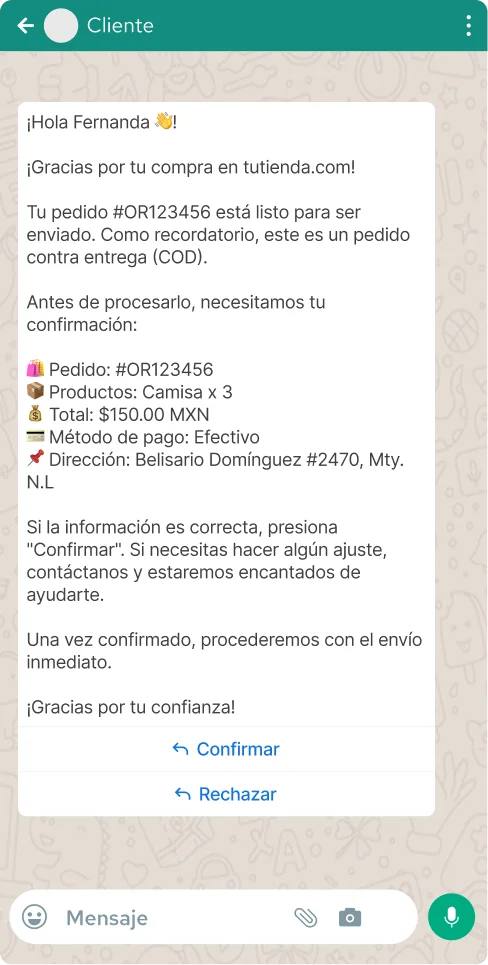
With this feature, Envia.com automatically sends a WhatsApp message to your customer before the shipment is dispatched, including all the details of their order and a button to confirm that they want to receive it. If the customer confirms, you can proceed with the shipment with greater certainty. If they decline, you’ll know before spending money on the shipping label.
How does it work?
- You create a shipment with cash-on-delivery (COD) service.
- Envia.com automatically sends a WhatsApp message to your customer number.
- The customer receives the message with the order details and chooses Confirm or Reject.
- You can check the confirmation status at My Shipments.
What your customer receives
The message includes all the information the customer needs to make a decision:
- Order Number
- Products and Quantities
- Total Due
- Payment method (cash)
- Shipping Address
- Confirm Button and Reject Button
ℹ️ The message is sent on behalf of your store. The customer sees your business name in the text, which builds trust and provides context about the order.
Steps to activate the notification
Log in to your Envia.com account.
2. Go to Notifications.
3. Select the tab For your customers
4. In the Ecommerce Pro section, enable the WhatsApp toggle in the cash-on-delivery notification.
5. Optionally, click "Preview" to see how your client will receive the message before activating it.
Order confirmation
You can view the confirmation status of each COD shipment directly from "My Shipments." There, you'll see whether the customer has accepted, rejected, or not yet responded.
FAQ
Is there an additional cost for this feature? COD notifications via WhatsApp cost the same as any other WhatsApp message: $1.00 MXN per successfully sent message in Mexico.
What happens if the customer rejects the order? You will receive notification of the rejection and will be able to make a decision before generating the waybill or coordinating with the customer.
What happens if the customer doesn't have WhatsApp or doesn't respond? If WhatsApp is not active on that number, the message will not be delivered. We recommend that you make sure to record the customer's WhatsApp number when taking the order.
Can I see an example of the message before I activate it? Yes. Use the "Preview" button in the Ecommerce Pro section under "Notifications" to see exactly how your customer will receive the message.

Did you find this resource useful?