Scheduled maintenance on Envia.com: Thursday, October 29, 12:00–12:30 a.m. Login, APIs, and operations will be unavailable.


Vtex

Steps to integrate my Vtex store
Section titled “Steps to integrate my Vtex store”- Open the Vtex Admin
- The process must be done with the superadmin user of the Vtex account.
- Generate key credentials
- Click your User in the upper-right corner.
- Select Account settings and then API keys.
- Click Generate key.
- Type Envia.com as the name to identify the key.
- In the Roles section, select Owner (Admin Super) and then click the Generate button.
- The token will now be provided through a one-time access link, which can only be opened once. If it is not accessed, the link expires automatically after 24 hours.
- Copy the token’s one-time access link, open a new tab, and paste the link.
- The screen will show the new Key and Token. Copy them because you will use them later.
- When you run the integration, access roles are requested. You need to grant full access or access to the OMS and Logistics roles.
- The requested URL is the store URL.
- Go to envia.com
- Go to Ecommerce Pro > Connect Store
- Start the integration
- Click the Integrate my ecommerce button and select Vtex.
- Enter your Vtex store URL and click continue.
- Enter the access keys generated in step 2.
- Enter the Application keyinApp Key
- Enter the Application tokenin App Token
- Enter your Vtex store name in Account Name and click Create
- Verify your email
- Verify the email registered in Envia.com and click Continue.
That’s it! Your Vtex store is now integrated with Envia.com
Set up your store in Envia.com
Section titled “Set up your store in Envia.com”You make these settings from your Envia.com dashboard. They are required for the integration to work correctly.

Origin address and packages
Set where your shipments leave from and which packaging you use. This is required to schedule pickups and get quotes
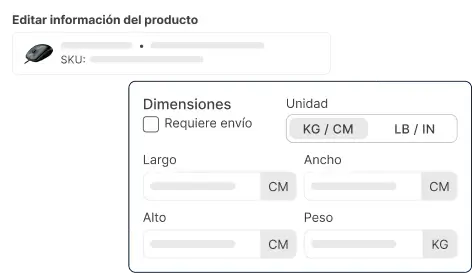
Products
Set the weight and size of each product. The system then calculates rates correctly and picks the right package

Automatic package
The system picks the best packaging for each order so you do not have to do it by hand
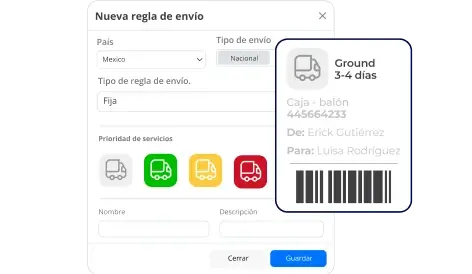
Automatic shipping rules
Set shipping rules that automatically calculate shipping costs for your orders
For more details, see our Help Center articles on setting up your store.