Scheduled maintenance on Envia.com: Thursday, October 29, 12:00–12:30 a.m. Login, APIs, and operations will be unavailable.


Offer less-than-truckload (LTL) at checkout
Less-than-truckload (LTL) moves palletized freight without renting a full truck. At your store checkout you can offer those rates next to parcel rates. The buyer sees the freight price before paying, and the order arrives in Ecommerce Pro already on pallets.
This is not available in every store or with every carrier. And it does not turn on by itself: each LTL service starts off. You turn it on.
Which stores it applies to
Section titled “Which stores it applies to”Only ecommerce with the automatic quoter (checkout): Shopify, Tiendanube, Wix, WooCommerce, BigCommerce, Ecwid, Jumpseller, and Yampi.
If your store has no checkout (for example Amazon), you do not offer LTL to the buyer this way. You generate the shipment by hand from LTL freight.
How it looks in Edit services
Section titled “How it looks in Edit services”In Set up carriers and services at checkout you open a carrier. If it has freight, the LTL group appears under Domestic. In Mexico, with Estafeta, it looks like this. Other carriers with LTL use the same group: services off, plus the box that explains when rates appear.
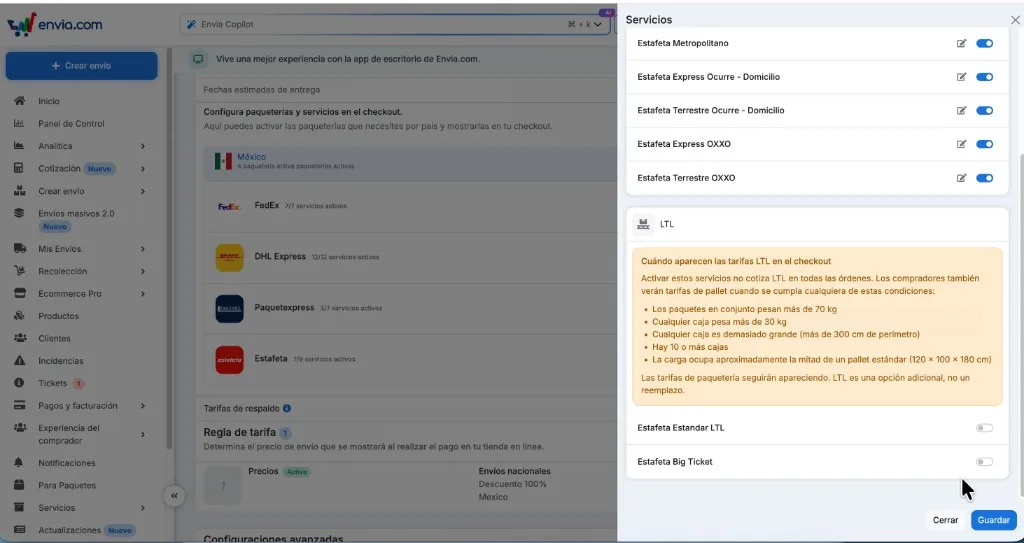
If Edit services does not show the LTL group, that carrier does not quote less-than-truckload. Example: DHL Express in the Mexico list has no LTL.
Steps to turn on LTL
Section titled “Steps to turn on LTL”-
Sign in to your Envia.com account.
-
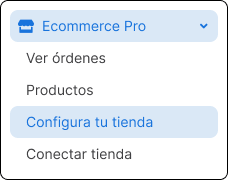
Open Ecommerce Pro > Set up your store.
-
Choose a store with checkout and open Settings.
-
In Store checkout, confirm the quoter is on.
-
In Set up carriers and services at checkout, open Edit services for a carrier that has LTL.
-
In the LTL group, turn on each service you want to offer (for Estafeta: Estafeta Estandar LTL and Estafeta Big Ticket). The Services switch at the top does not turn them on.
-
Click Save.
Carriers with LTL, by country
Section titled “Carriers with LTL, by country”Only these have an LTL service. What you see in Edit services for your store is what applies.
| Country | Carriers with LTL |
|---|---|
| Mexico | FedEx, Paquetexpress, Estafeta, Almex, Fletes México, Envia, Entrega, Tres Guerras, Big Logistics, Castores, FedEx Freight |
| United States | SAIA, FedEx, Daylight, FedEx Freight |
| Puerto Rico | SAIA, FedEx, Daylight, FedEx Freight |
| Spain | Transaher, FedEx, TDN, CLM |
| Brazil | Correios, FedEx |
| India | Delhivery, Blue Dart, Ekart |
| Italy | Poste Italiane |
Canada, Colombia, Chile, Argentina, Guatemala, and France do not have LTL in the catalog.
When the buyer sees LTL
Section titled “When the buyer sees LTL”Turning the service on does not quote LTL on every order. The When LTL rates appear at checkout box lists the conditions. One is enough:
- The packages together weigh more than 70 kg.
- Any box weighs more than 30 kg.
- Any box measures more than 300 cm in girth.
- There are 10 or more boxes.
- The load occupies about half of a standard pallet (120 × 100 × 180 cm).
Parcel rates still appear. LTL is an extra option; it does not replace them.
If the buyer chooses LTL, the order is saved on pallets. Automatic package does not change them.
Check that it works
Section titled “Check that it works”- At your store checkout, quote a small order. Only parcel services should appear.
- Quote an order that meets one condition from the box. The LTL services you turned on should appear.
- Complete a test order with LTL and open it in View orders. Confirm the package is a pallet.
If LTL rates do not appear
Section titled “If LTL rates do not appear”- Your ecommerce must be one that has checkout.
- The store quoter must be on.
- You turned on at least one service in the LTL group and saved.
- The test order meets one condition from the box.
- The carrier has an LTL group. If it does not, it does not apply.
Frequently asked questions
Section titled “Frequently asked questions”Does the Services control turn on LTL? No. That switch only affects parcel (boxes). You turn LTL services on one by one, then Save.
Do all stores have LTL at checkout? No. Only those with the automatic quoter. Amazon and others without checkout do not offer LTL to the buyer this way.
Do all checkout carriers have LTL? No. Only those in the table, and only if they are in your store. If you do not see the LTL group, that carrier does not quote freight.
Does Automatic package build the pallet? No. If the buyer chose LTL, Envia stores the pallets and Automatic package does not overwrite them.