Scheduled maintenance on Envia.com: Thursday, October 29, 12:00–12:30 a.m. Login, APIs, and operations will be unavailable.


Sync Shopify product dimensions
Shopify dimensions correspond to the product (weight, width, length, and height), not the package. New products you sync from your Shopify store automatically include these measurements in Envia.com. If you already have synced products and want to update their dimensions, you can do so by syncing existing products. This guide explains how.
Before you start
Section titled “Before you start”- Your Shopify store is already connected with Envia.com.
- You have products in your Shopify catalog with defined dimensions.
New products: automatic sync
Section titled “New products: automatic sync”When you sync new products from Shopify, Envia.com automatically brings:
- Product weight
- Product width
- Product length
- Product height
You don’t need to enable any additional option. Product dimensions in Shopify are imported directly to Envia.com.
Update existing products
Section titled “Update existing products”- Sign in to your Envia.com account.
- Go to Ecommerce Pro > Products.
- Open the sync menu (above the table).
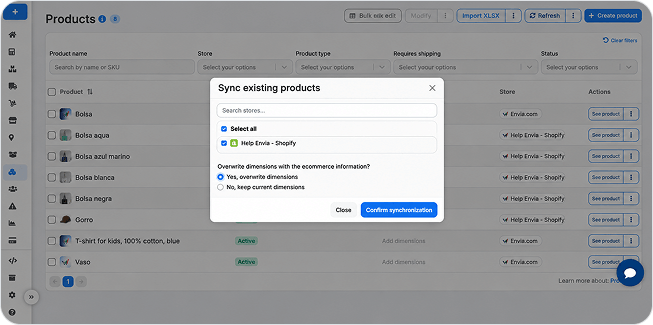
- Choose Sync existing products or Sync new and existing products.
- Select your Shopify store from the list. You can search by name or use Select all if you only have one.
- In the modal that appears, answer the question “Overwrite dimensions with information from the ecommerce?”:
- “Yes, overwrite dimensions”: dimensions in Envia.com are updated with those from Shopify (weight, width, length, height).
- “No, keep current dimensions”: the dimensions you already had saved in Envia.com are kept.
- Click Confirm sync.
Depending on the number of products, the process may take a few minutes. When it finishes, you will see the updated dimensions in the products table.
Frequently asked questions
Section titled “Frequently asked questions”Are Shopify dimensions for the product or the package? They are for the product. Shopify changed its fields so they correspond to the item dimensions (weight, width, length, height), not the packaging.
What happens if my Shopify products don’t have dimensions? If a product in Shopify doesn’t have weight or measurements defined, Envia.com won’t be able to import those dimensions. Make sure to fill in the fields in your Shopify store before syncing.
Can I sync a single product? Yes. In the sync menu, choose Sync a specific product, enter the product identifier in Shopify, and answer the question about overwriting dimensions. For more details, see Sync products.
What should I do if dimensions don’t update? Verify that the product in Shopify has the weight, width, length, and height fields completed. If the problem persists, sync again or check the product status in the sync progress.