Scheduled maintenance on Envia.com: Thursday, October 29, 12:00–12:30 a.m. Login, APIs, and operations will be unavailable.


View proof of delivery (POD) for your shipments
Proof of Delivery (POD) lets you confirm that a package was delivered correctly without contacting support or the carrier. You can get delivery evidence such as signatures or photos, and have backup for claims or returns.
What is POD and what is it for?
Section titled “What is POD and what is it for?”POD (Proof of Delivery) is a document issued by the carrier that confirms successful delivery of your package. Depending on the carrier, it may include:
- Recipient signature
- Photo of the package at the delivery point
- Digital receipt with data on who received it
Available carriers
Section titled “Available carriers”This feature is available for shipments made with:
- DHL
- FedEx
- Estafeta
- UPS
- 99 minutos
Download the proof of delivery
Section titled “Download the proof of delivery”-
Sign in to your Envia.com account
-
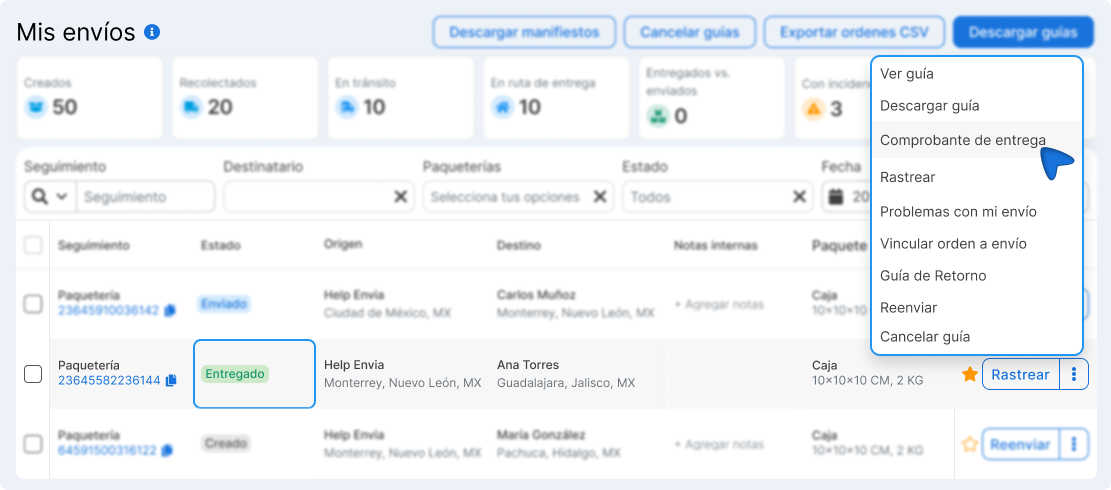
Go to the My Shipments section.
-
Find the shipment with Delivered status.
-
Click the three dots ( ⋮ ) and select Proof of delivery.
Available countries
Section titled “Available countries”POD is available for domestic and international shipments in the following countries:
Mexico · United States · Colombia · Argentina · Chile · Brazil · Spain · France · Italy · Canada · Guatemala
Frequently Asked Questions
Section titled “Frequently Asked Questions”What do I do if the “Proof of delivery” option does not appear in the menu? Check that the shipment has Delivered status and is from one of the compatible carriers. If it meets both conditions and the option still does not appear, that specific service may not include POD — contact support to confirm.
Can I use the POD as evidence in a claim? Yes. The POD is an official document issued by the carrier and serves as valid evidence in delivery disputes, insurance claims, or returns with your customer.
Is POD available for international shipments? It depends on the carrier and the destination country. To check, see if the option appears in the shipment menu once it is marked as delivered.