Scheduled maintenance on Envia.com: Thursday, October 29, 12:00–12:30 a.m. Login, APIs, and operations will be unavailable.


Origin locations and packages

Setting up your origin location and package details correctly is essential to ensure accurate rate and delivery time calculations. This setup will help you avoid weight or dimension errors and optimize your logistics process.
Why is it important to set this up?
-
Avoid rate errors: The correct origin location ensures an accurate calculation based on distance.
-
**Optimize delivery times:**With package dimensions and weight set up correctly, you avoid delays and issues with carriers.
-
**Manage your warehouses efficiently:**Manage multiple shipping addresses from one place.
Set up origin locations
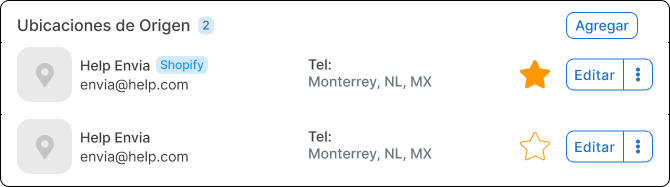
Section titled “Set up origin locations”Add and manage multiple shipping locations from one place to simplify warehouse management. Mark with a star (⭐) the location you use most often.
-
Go to Ecommerce Pro > Set up your store
-
Choose your store and find Origin locations
-
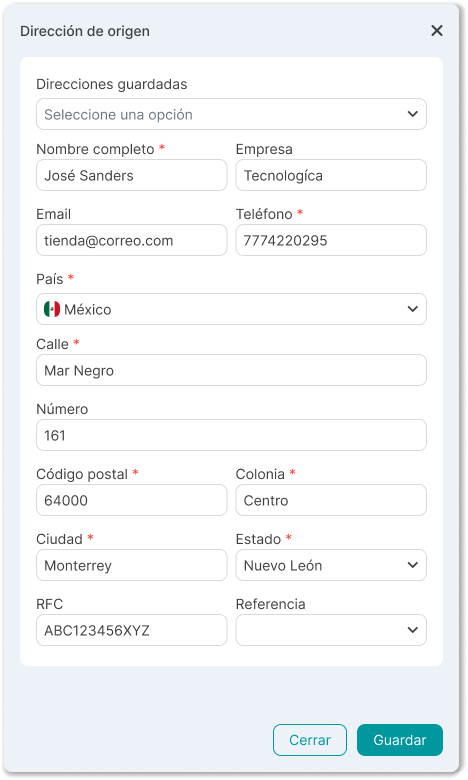
Click Addand complete the fields
- Full name
- Company name
- Email and phone
- Country
- Street and number
- ZIP code and neighborhood
- City and state
- Tax ID and references
Important notes
Section titled “Important notes”- Shopify stores use the address synced from the ecommerce store by default.
- These addresses have a “Shopify” badge that identifies them clearly.
Set up packages
Section titled “Set up packages”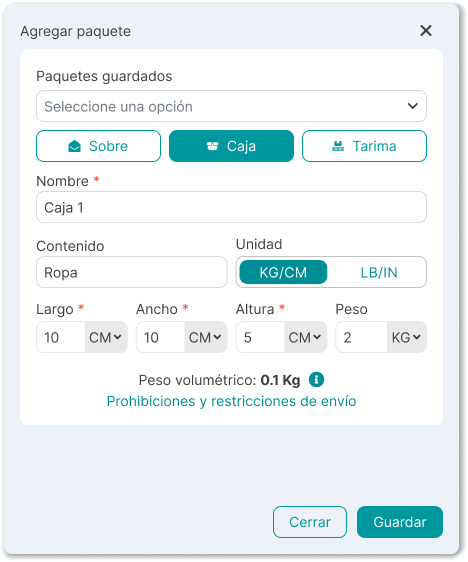
Customize your packages by specifying the measurements and weight you use most often in your shipments. Add at least one package and mark with a star (⭐) the one you use most often.
- Go to Ecommerce Pro > Set up your store
- Choose your store and find Packages
- Click Add and complete the fields
- Name
- Contents
- Unit (kg/cm or lb/in)
- Dimensions (length, width, height)
- Weight (kg/g or lb/oz)
Frequently asked questions
Section titled “Frequently asked questions”- What happens if I have several origin locations?
You can add as many as you need. Mark the main location with a star to use it as the default.
- How many packages can I register?
You can register all the packages you need. This makes it easier to quickly select the right package for each shipment.
- What happens if I do not set up these options?
Without a correct origin location and package setup, rates may be calculated incorrectly and shipments may be delayed due to weight or dimension errors.