Scheduled maintenance on Envia.com: Thursday, October 29, 12:00–12:30 a.m. Login, APIs, and operations will be unavailable.


Pay duties and taxes with Envia Guaranteed
Envia Guaranteed (Prepaid) is the upfront payment of duties and taxes on an international shipment. On the confirmation it appears as Guaranteed Prepaid. It puts those charges on the label so the person who receives the package does not pay them on delivery. A charge the buyer did not expect can delay the package or make them refuse it. When you choose it, you pay a fixed amount for those charges now.
Compare who pays the duties
Section titled “Compare who pays the duties”In Duties and taxes you can choose only one option per label. You only see the options that carrier and route allow.
| Option | Who pays | What it means |
|---|---|---|
| Guaranteed Prepaid | You, now (marked Recommended). | The customs amount is included and guaranteed. The person who receives the package does not pay on delivery. Sometimes called DDP (Delivered Duty Paid). |
| Sender | You, on your Envia account after delivery. | The recipient does not pay at the door. The final amount can change. |
| The recipient pays on delivery | The person who receives it, at customs or from the courier. | The amount is not fixed when you generate the label. Delivery can be delayed or fail. Sometimes called DAP (Delivered At Place). |
What stays guaranteed
Section titled “What stays guaranteed”The duties and taxes you see when you generate the label stay fixed. If the import authority later assesses a higher amount, you do not pay that difference on those charges.
That applies when the goods, the description, the tariff classification, the quantities, and the values were declared correctly, and when the service conditions are met. The tariff classification is the HS Code: the number that identifies the product type for customs. The declaration must be truthful, precise, and match what you ship.
Pay with Envia Guaranteed
Section titled “Pay with Envia Guaranteed”The goods must be eligible, and the carrier and route must be compatible. If the option does not appear in the quote, that combination does not calculate it.
-
Sign in to your Envia.com account.
-
Open Create shipment and complete an international shipment.
-
Declare each product with a description, HS Code, quantity, and actual value. How to fill in the invoice: Product declaration.
-
On the confirmation, open Duties and taxes and choose who pays.
-
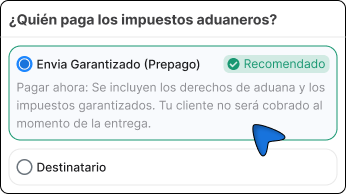
Choose Guaranteed Prepaid. The box says: Pay now. Guaranteed customs duties and taxes are included. Your customer will not be charged at delivery.
-
If you change the Export reason, click Update and review Cost Summary before you continue.
-
Accept the terms and click Generate label.
If you sell from a connected store, who pays at checkout is set up separately: Set up duties and taxes at checkout.
If Envia Guaranteed does not appear
Section titled “If Envia Guaranteed does not appear”Guaranteed Prepaid depends on the carrier, the route, and the service. When the quote allows it, you see it with DHL, UPS, and FedEx. It does not apply to all of their services or destinations.
- If you do not see Duties and taxes, that route does not let you choose who pays. Declare the products and generate the label.
- If you see the block and you do not see Guaranteed Prepaid, that combination does not calculate prepaid guaranteed customs charges. Check the description, the HS Code, and the value. Then choose another visible option or another carrier.