Scheduled maintenance on Envia.com: Thursday, October 29, 12:00–12:30 a.m. Login, APIs, and operations will be unavailable.


Retry shipment sync
When you generate labels for your orders in Ecommerce Pro > View orders, issues can occur when updating the orders in your store. That can prevent orders from being marked as processed or the tracking number from showing correctly on the order.
When an order needs to be synced, it may appear as Partially Prepared in the table, and in the shipment information you will see a message that says Requires shipment sync.
Table
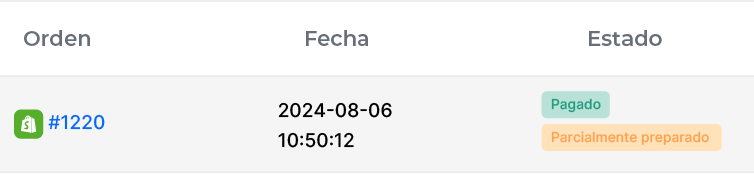
Shipment information

Common causes
Section titled “Common causes”The most frequent reasons sync can fail include:
- Connection issues: Temporary disconnects between your store and our platform.
- Request limits: The store may block requests if too many are sent in a short period.
- Ecommerce configuration errors: Issues related to your products from our platform.
- Errors in the data sent: Incompatibilities in the data sent to our API.
- API server issues: Technical failures in the API that can interrupt the sync.
- Expired token: If the authentication token has expired, the sync will not complete.
Solutions
Section titled “Solutions”1. Automatic
To improve shipment sync, our system retries automatically when certain errors occur (such as codes 503 or 429). The process works as follows:
- Automatic retries: After an error, the system tries to sync the shipment up to 3 times.
- Wait time: With each attempt, the wait time increases by (number of attempts * 1.5 seconds) to avoid overloading the servers.
- Attempt limit: After 3 failed attempts, automatic sync for the order stops.
2. Individual order
When the automatic solution stops, you can sync your orders manually one at a time.
Requires shipment sync
Shows the orders that need to be synced.
Prepared
Shows the orders that were synced correctly.

3. Bulk orders
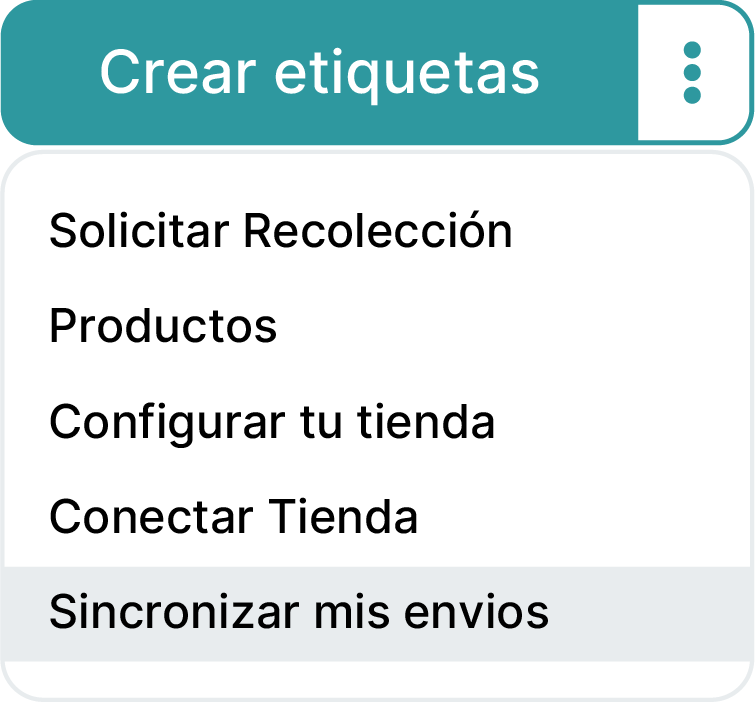
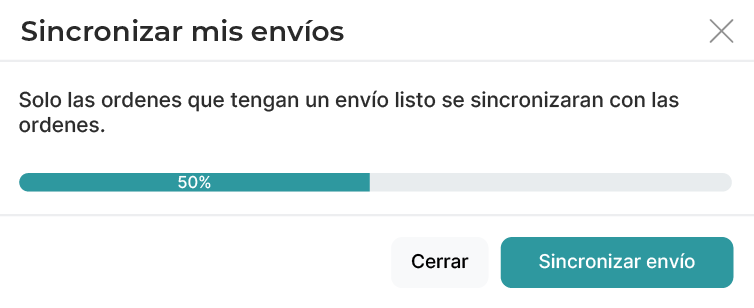
You can also run a manual sync for several orders at once from Sync my shipments. This is especially useful when several orders did not sync correctly, so you can fix them all at once.
Considerations
Section titled “Considerations”- Sync is only possible for packages that have labels.
- Packages must contain products.
- Shipments sync individually per order.