Scheduled maintenance on Envia.com: Thursday, October 29, 12:00–12:30 a.m. Login, APIs, and operations will be unavailable.


WhatsApp confirmation for cash on delivery (COD)
When you sell with cash on delivery, the biggest risk is that the customer rejects the package at delivery. That generates return costs, wasted labels, and lost time.
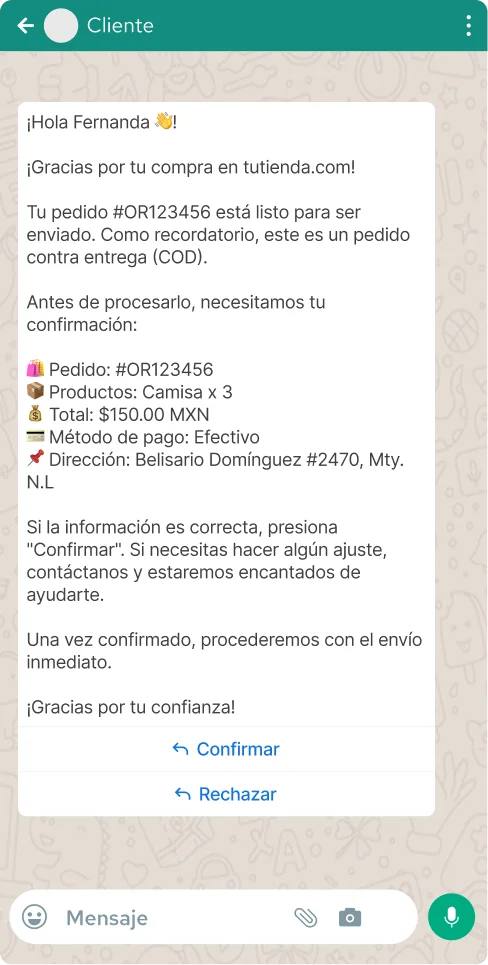
With this feature, Envia.com automatically sends a WhatsApp message to your customer before the shipment goes out, with all the order details and a button to confirm they want to receive it. If the customer confirms, you proceed with the shipment with more certainty. If they reject it, you know before you spend on the label.
How does it work?
Section titled “How does it work?”- You create a shipment with cash on delivery (COD) service.
- Envia.com automatically sends a WhatsApp message to your customer’s number.
- The customer receives the message with the order details and chooses Confirm or Reject.
- You can see the confirmation status from My Shipments.
What your customer receives
Section titled “What your customer receives”The message includes all the information the customer needs to make a decision:
- Order number
- Products and quantities
- Total to pay
- Payment method (cash)
- Delivery address
- Confirm button and Reject button
Steps to enable the notification
Section titled “Steps to enable the notification”-
Sign in to your Envia.com account
-
Go to Notifications.
-
Select the For your customers tab
-
In the Ecommerce Pro section, turn on WhatsApp for the cash on delivery notification.
-
Optionally, click Preview to see how your customer will receive the message before you enable it.
Order confirmation
Section titled “Order confirmation”You can see the confirmation status of each COD shipment directly from My Shipments. There you will see whether the customer already accepted, rejected, or has not responded yet.
Frequently asked questions
Section titled “Frequently asked questions”Does this feature have an additional cost? The COD WhatsApp notification has the same cost as any WhatsApp message: Mexico $1.00 MXN per message sent successfully.
What happens if the customer rejects the order? You will receive the rejection notification and can make a decision before generating the label or coordinating with the customer.
What happens if the customer does not have WhatsApp or does not respond? If the number does not have WhatsApp active, the message will not be delivered. We recommend making sure you capture the customer’s WhatsApp number when you take the order.
Can I see an example of the message before enabling it? Yes. Use the Preview button in the Ecommerce Pro section inside Notifications to see exactly how your customer will receive the message.