Scheduled maintenance on Envia.com: Thursday, October 29, 12:00–12:30 a.m. Login, APIs, and operations will be unavailable.


Cash on Delivery (COD) shipments
On Envia.com you can offer your customers the Cash on Delivery (COD) option. This means your buyers will pay in cash when they receive the package, directly to the courier.
You can also turn on automatic confirmation by WhatsApp before generating the label. That way you reduce refusals, avoid returns, and save unnecessary costs.
How does it work?
Section titled “How does it work?”-
You turn on the service when you generate the label.
-
The courier collects cash from the recipient at delivery.
-
Envia.com transfers the collected amount to your account from Ecart Pay, on specific dates.
Steps to use COD on my shipments
Section titled “Steps to use COD on my shipments”- Sign in to your Envia.com account
- Before generating your label, select the additional service Cash on delivery and enter the amount to collect.
- Select the shipping option that best fits your needs and generate your label.
- Once the package is delivered, request the money withdrawal from Ecart Pay.
See how to request a cash on delivery withdrawal.
Important considerations
Section titled “Important considerations”- Only cash is accepted. Payments by transfer or card are not received.
- If the end customer does not pay, you as the seller are responsible for the amount.
- If a package appears as delivered but was not received, a chargeback will be generated for the corresponding amount, which will be reviewed before it is applied. More information about chargebacks.
Carriers available for Cash on Delivery (COD)
Section titled “Carriers available for Cash on Delivery (COD)”Currently, Cash on Delivery is available in the following countries and with the following carriers:
🇨🇴 Colombia
- Coordinadora
- 99 Minutos
- Servientrega
- InterRapidísimo
- TCC
- LastMile
🇪🇸 Spain
- Ontime
- Zeleris
- Correos
- Correos Express
- Transaher
- Seur
- Ctt Express
- DHL Express
- UPS
- TDN
🇫🇷 France
- UPS
🇬🇹 Guatemala
- ForzaDelivery
- Deliver
🇮🇳 India
- Borzo
- Ecom Express
- Delhivery
- BlueDart
- XpressBees
- DTDC
- Ekart
- Amazon Shipping
🇮🇹 Italy
- BRT
- UPS
🇲🇽 Mexico
- FedEx
Automatic confirmation of COD orders
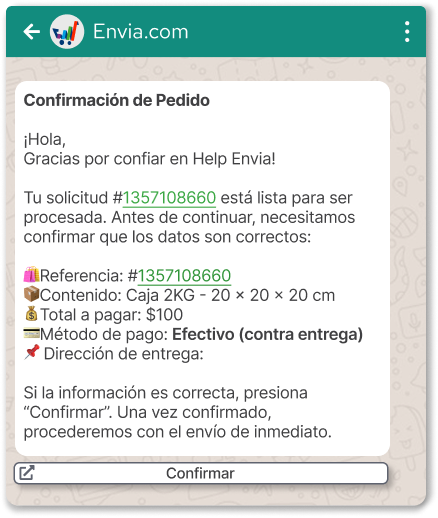
Section titled “Automatic confirmation of COD orders”To avoid returns and optimize your operation, you can turn on an automatic WhatsApp message every time you receive a COD order. The customer can confirm or cancel the order before you generate the label.
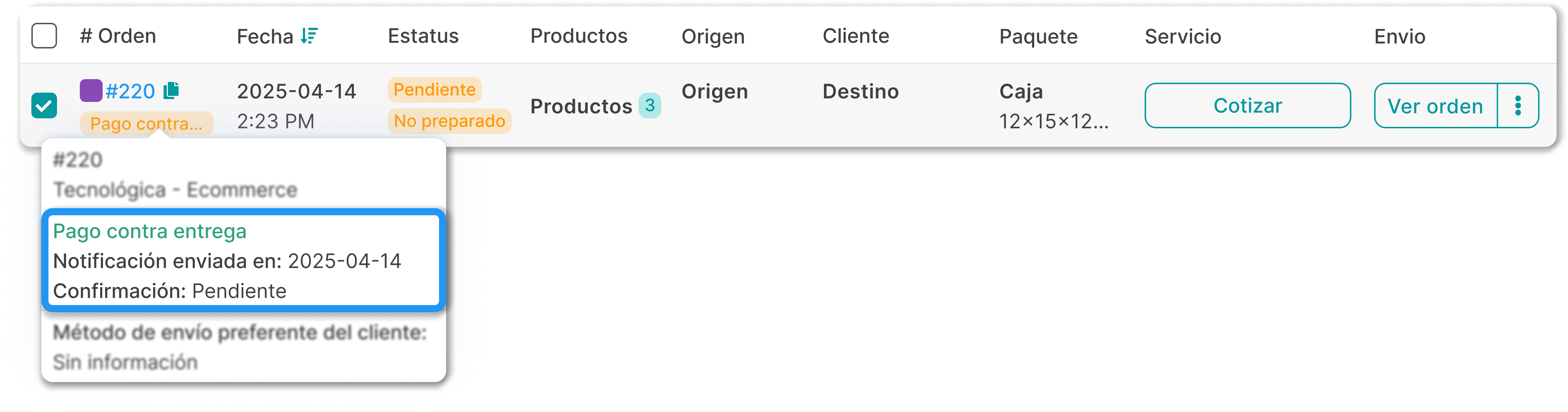
To see the order confirmation:
-
From your Envia.com account, go to the View orders section.
-
Hover over the order to see the confirmation status.
Important considerations
Section titled “Important considerations”- Available in all countries except: Argentina, Chile, the United States, and Brazil.
- It only works if the order includes a phone number.
- Not available for international shipments.