Scheduled maintenance on Envia.com: Thursday, October 29, 12:00–12:30 a.m. Login, APIs, and operations will be unavailable.


Fallback rates
Fallback rates are fixed prices shown at checkout as an alternative when carriers cannot generate a quote due to technical errors or lack of coverage. They work for both domestic and international shipments.
The main benefits of fallback rates are:
- They help prevent lost sales: They ensure your customers always have a shipping option available.
- Flexibility: Lets you define rates by weight ranges and shipment type (domestic or international).
- Better customer experience: Guarantees continuity in the purchase process, even when unexpected issues occur with carriers.
Steps to add a fallback rate
Section titled “Steps to add a fallback rate”-
Go to Ecommerce Pro > Set up your store
-
Make sure Store checkout is turned on and you have selected at least one carrier service.
-
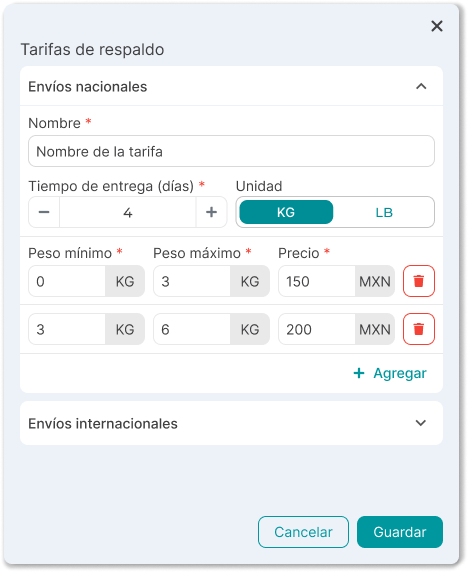
Turn on the Fallback rates option and configure your rates:
- Set whether your rate is for domestic or international shipments
- Add the name that will be shown at checkout to customers
- Assign an estimated delivery time (days)
- Select the weight unit and define rates by weight range
-
Save the changes.
Once configured, fallback rates will be ready to turn on automatically in contingency cases.
Important considerations
Section titled “Important considerations”- They only turn on if no selected carrier can quote.
- If checkout is turned off, fallback rates are also turned off.