Scheduled maintenance on Envia.com: Thursday, October 29, 12:00–12:30 a.m. Login, APIs, and operations will be unavailable.


Claim the Ecommerce Pro credit

The Ecommerce Pro credit is a balance top-up for your company. You use it in Envia.com after you connect a store Envia has never seen. It is added once, for the amount shown on the notice: 10 USD, already converted and rounded to your company’s currency. The conditions are in the promotion terms and conditions.
Requirements to claim it
Section titled “Requirements to claim it”The notice appears only when your company can take part. If you do not see it, this credit cannot be claimed from another menu.
All of these must be true:
- The company was created on or after September 10, 2026.
- The company is verified.
- You connected a store Envia had never integrated. The same domain, including subdomains, counts as the same store. A deleted store still counts.
marca.comandmarca.com.mxare different stores. Envia product shops and test or temporary addresses do not qualify. - There is at least one Ecommerce Pro order on any store of the company. The shipment does not need to be delivered.
- The person who claims it is the owner or an administrator. The rest of the team can see the list, without the button.
Steps to claim the credit
Section titled “Steps to claim the credit”-
Sign in to your Envia.com account.
-
Open Ecommerce Pro, Products, the list of connected stores, or the screen to connect a store. The notice is on those four screens. It does not appear on an order’s detail or in Payments.
-
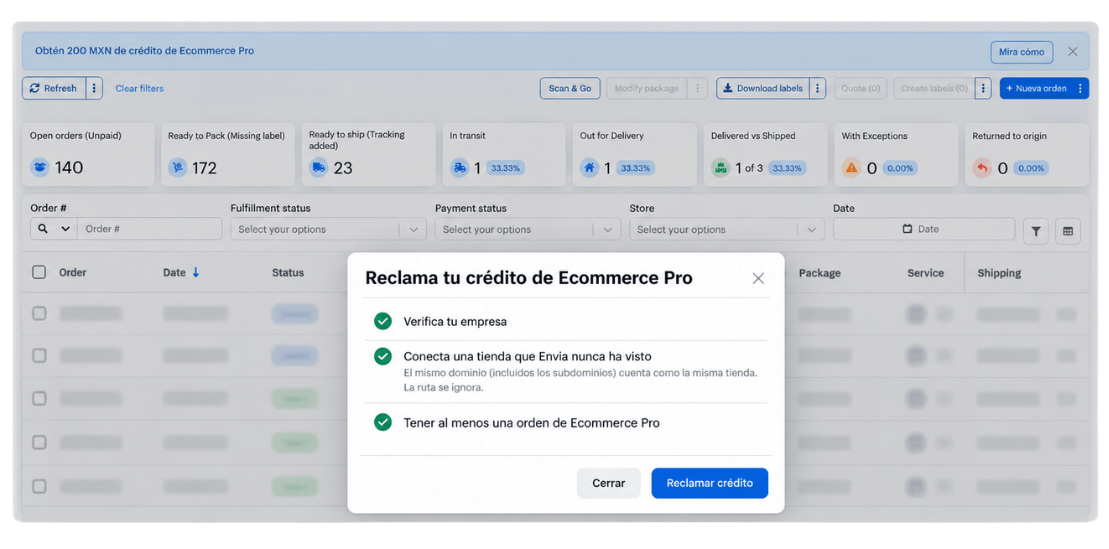
On the notice, select See how. You see the amount in your company’s currency. This step opens the list and does not add the balance yet.
-
Finish whatever is still pending. Each incomplete item has a link to that screen:
- Verify your company opens verification.
- Connect a store Envia has never seen opens the screen to connect a store.
- Have at least one Ecommerce Pro order opens your orders. The order can come from any of your stores.
-
When all three items are done, select Claim credit. Only the owner or an administrator sees this button.
What happens next
Section titled “What happens next”The amount on the notice is added to the company’s balance. The notice no longer appears. That balance pays for services in Envia. It is a one-time top-up, not a carrier coupon or a discount on a label.
If you cannot claim it
Section titled “If you cannot claim it”- The notice does not appear. The company is not part of this promotion, it was already claimed, or this credit is not available in your country.
- The store was already integrated in Envia, even under another company or after it was deleted. The same domain and its subdomains count as the same store.
- The company still needs verification, a new store, or an Ecommerce Pro order.
- You are not the owner or an administrator. You can review the list, without the Claim credit button.
- You closed the notice. Sign in again. If you can still claim it, the notice comes back.