Scheduled maintenance on Envia.com: Thursday, October 29, 12:00–12:30 a.m. Login, APIs, and operations will be unavailable.


API token
The token lets you use the Envia.com API from your account. It is used mainly to identify quotes and generate shipping labels. For more information on how to integrate and use our API, see our documentation.
Steps to get the token
Section titled “Steps to get the token”-
Sign in to your Envia.com account.
-
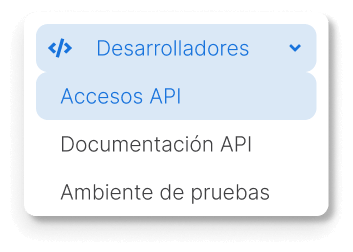
Go to the Developers section and select API access.
-
In the API access section, click Add.

-
Once it is generated, you can copy and paste it where you need it.
Frequently asked questions
Section titled “Frequently asked questions”Does the token expire?
The token does not have a predefined expiration date. However, you can delete it and generate a new one if needed. Once deleted, the token is invalidated and stops working.
Can I have several tokens per account?
Yes, you can generate multiple tokens in the same account. In addition, each user in the account can have their own tokens, which makes it easier to manage and track integrations.
Can I limit the token permissions?
Currently, it is not possible to restrict the permissions of a token. All tokens have full access to the functionality available through our API.