Scheduled maintenance on Envia.com: Thursday, October 29, 12:00–12:30 a.m. Login, APIs, and operations will be unavailable.


Shipment reports and account statements
Reports on Envia.com are downloadable Excel files that contain all relevant information about your logistics or financial operations on the platform. They are an essential tool for visibility, control, and backup of shipments made, as well as the financial movements of your account.
Having these reports allows companies to:
- Validate logistics costs.
- Perform accounting reconciliations.
- Track their deliveries.
- Resolve incidents with documentary backup.
Reports section
Section titled “Reports section”-
Sign in to your Envia.com account.
-
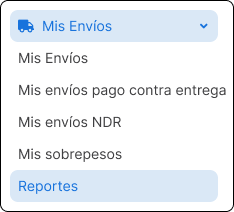
From the left sidebar, click My Shipments > Reports.
Available report types
Section titled “Available report types”There are two types of reports in the reports panel.

| Report type | Included content |
|---|---|
| Shipments report | Complete detail per label: sender, recipient, dates, dimensions, services, taxes, and more. |
| Account statement report | Financial record per event: label, charge, payment, weight, balance, and movement type. |
Steps to download a report
Section titled “Steps to download a report”-
Go to the Reports section.
-
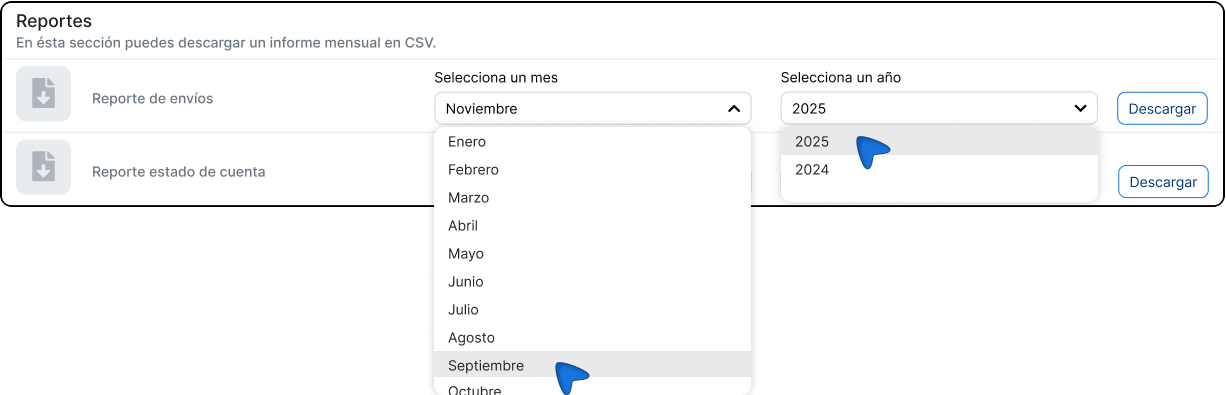
In the type of report you need (shipments or account statement), select the month and year you want information for.
-
Click Download.

-
The system will automatically generate an Excel file with the selected data.
Report examples and content
Section titled “Report examples and content”Shipments report
Section titled “Shipments report”This file includes a complete breakdown for each label generated, with more than 60 columns. It contains operational, tax, and technical data such as:
- Label data:
tracking,tracking_number,status,service,created_at,shipped_at,delivered_at,order_number. - Sender: name, company, email, phone, address, city, state, country, postal code, RFC, references.
- Recipient: name, company, email, phone, address, city, state, country, postal code, RFC, references.
- Shipment details: shipment type, origin, weight, declared contents, quantity, dimensions, unit of measure.
- Costs: insurance, extended zones, import, additional services, cash on delivery, taxes, total, and grand total.
- Administrative: name and email of who generated the label, PDF label file, number of packages.
Account statement report
Section titled “Account statement report”This report focuses on the financial side of your movements. Each row represents an action that affects your balance. It includes:
- Identifiers:
uid,tracking,tracking_number,carrier. - Dates and weights:
created_at,kilograms. - Charges: insurance, extended zone, overweight.
- Financial movements:
paid(charge or credit),balance(total balance after the movement). - Event type: for example,
Shipment Guide. - Description: context information about the operation.
Frequently asked questions
Section titled “Frequently asked questions”Can I download reports by day or a custom range?
No. You can only select a full month and year.
What format does the downloaded file have?
It is an .xlsx file, compatible with Excel, Google Sheets, and other spreadsheet programs.
Why does my report appear empty?
Check that you had shipments or movements during the selected month and year. If there was no activity, the file will have no data.
Can I automate report downloads?
No. For now, downloads must be done manually from the panel.