Scheduled maintenance on Envia.com: Thursday, October 29, 12:00–12:30 a.m. Login, APIs, and operations will be unavailable.


Track labels
Envia.com is a logistics platform that connects online stores with different carriers. If you bought something from a store that uses Envia.com, you can check the status of your shipment here.
How to track your package
Section titled “How to track your package”-
Go to the tracking page
-
Enter your tracking number in the search field
-
Click Track
What you will see when you track
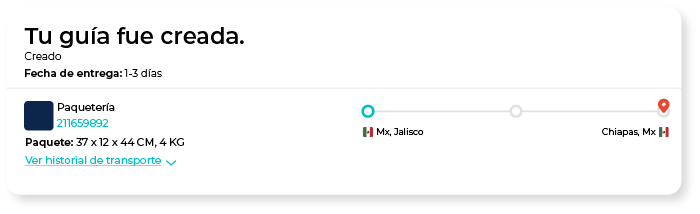
Section titled “What you will see when you track”Once you enter the tracking number, you will see:
- Assigned carrier: the carrier that is delivering your package (FedEx, DHL, Estafeta, etc.)
- Shipment information: origin, destination, and package dimensions
- Timeline: shipment progress: Order created, Picked up, In transit, Out for delivery, Delivered
- Event history: chronological record of each package movement with date and time
Shipment statuses
Section titled “Shipment statuses”| Status | What it means |
|---|---|
| Order created | The label was generated but the package has not been picked up yet |
| Picked up | The carrier picked up the package and it is on its way |
| In transit | The package is moving between distribution centers |
| Out for delivery | The package is on the delivery route today |
| Delivered | The package was delivered to the address |
| Failed attempt | The carrier tried to deliver but could not; a new appointment may be required |
| Incident | A problem occurred that needs attention |
| Canceled | The shipment was canceled |
Problems with your shipment?
Section titled “Problems with your shipment?”-
Tracking information is not showing yet. It can take a few hours from when the label is generated until the carrier registers the movement. If it was just created, wait a few hours and try again.
-
The status has not changed in several days. Contact the store where you made your purchase. They can contact the carrier for more information.
-
The package shows as delivered but you did not receive it. First check whether someone at your address received it or if it was left in a safe place. If you cannot find it, contact the store — they are the ones who can start an investigation with the carrier.
-
The tracking number is not recognized. Check that you are entering the correct number and that it has no extra spaces. If the problem continues, contact the store to confirm the tracking number assigned to your order.